 Fordee
Guide · Final Cut Pro
The best LUT loader for Final Cut Pro
You bought a pack of fifteen looks. Now you're applying them one at a time to find out which one suits your shot, and by the fourth you've forgotten what the first one looked like. That's the problem a LUT loader is supposed to solve. Here's what one actually has to do, and the free one we'd point you to. Full disclosure up front: we make it.
What a LUT loader has to do
Four things: read the formats your packs actually ship in, show you every look on your own frame before you commit, load a whole folder at once, and let you back the strength off.
Final Cut has a built-in Custom LUT effect, and for a single look you already know you want, it's fine. The trouble starts the moment you own a pack. It applies one LUT to one clip, with nothing to compare against, so finding the right look out of fifteen means applying, judging, undoing, and applying the next one. Do that on a few clips and you've lost the afternoon.
So the first job is seeing them. Not on a stock model in a product photo, on your shot, with your lighting and your skin tones. A grade that looks incredible on a beach at golden hour can fall apart on an indoor interview, and you only find that out on your own frame.
Second is formats. LUT packs don't all ship as the same file type, and finding out yours is the one format your editor won't open is a bad afternoon.
Third is loading in bulk. Pointing a loader at a folder and having every look in it show up is the difference between a tool and a chore.
Fourth is strength. Most looks are built at full power for a reason, but plenty of shots want it at sixty percent. Without a strength control your only options are all of it or none of it.
The formats that matter
Color packs ship as .cube, .3dl, .csp and .look. A loader worth installing reads all four, so the pack you paid for isn't stuck behind a file extension.
.cube is the one you'll meet most. It's the closest thing the industry has to a default, and most packs sold today ship in it, including ours.
.3dl turns up in older sets and in stuff that came out of a finishing house. .csp is Cine Space. .look came out of SpeedGrade and still shows up in packs with an Adobe lineage. None of them are exotic, they're just what different tools wrote at different times, and if you buy enough packs you'll eventually be handed one.
Worth knowing: a LUT is a color translation, not a magic button. If you shot Log, get the footage into Rec.709 first, then put the look on top. Drop a look straight onto raw Log footage and it'll read flat and wrong, and the look isn't what's broken.
Previewing on your own frame
The feature that actually changes the job: every look in the pack rendered onto the frame your playhead is parked on, all at once, as a grid you can click.
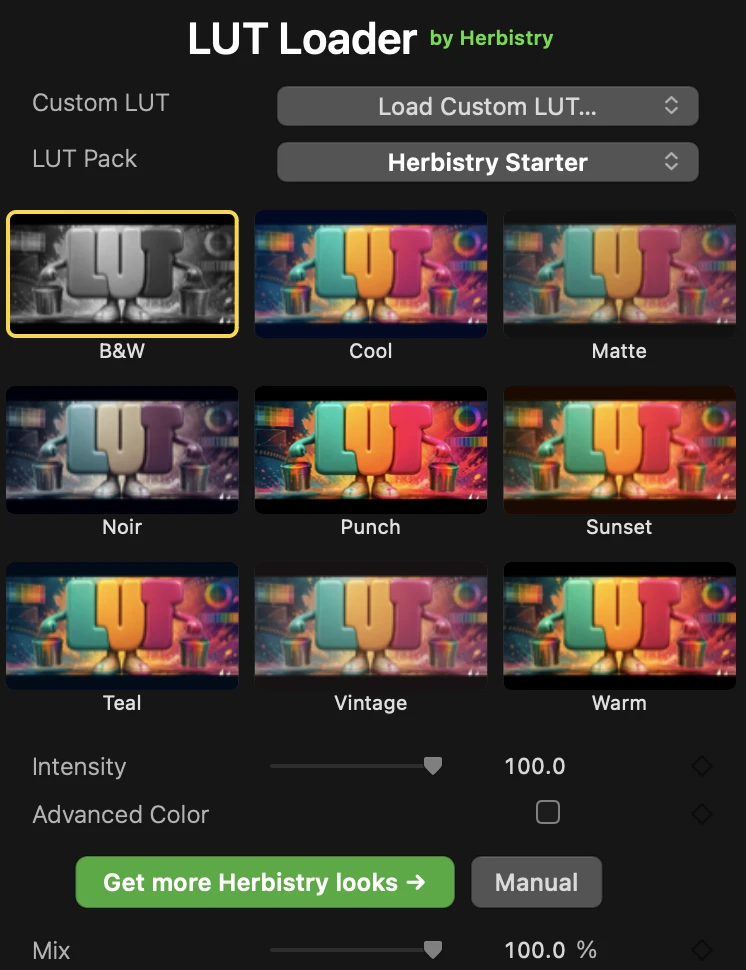
This is the whole argument. Instead of describing a look to you in words, the loader shows you the look, on your footage, next to all the others. You scan the grid, you see which one suits the shot, you click it. That's it.
One practical note, because it catches people: the grid renders the frame the playhead is sitting on. If your playhead is parked somewhere else in the timeline, you'll get default cards instead of your shot. Move it onto the clip and the tiles fill in.
One file, or a whole pack
Two ways in. "Load Custom LUT" takes a single file. "Add a LUT Pack" points at a folder and pulls in every look inside it at once.
Single file covers the one-off: a look a client sent you, a conversion LUT for a specific camera, something you built yourself. Folder loading covers the rest of the time, when you've bought a set and want all of it available without importing fifteen files by hand.
There's a companion Title too, which is the bit people don't expect. Drop it on a lane above two or more clips and it grades the whole stack underneath at once. If you've ever applied the same look down a timeline clip by clip, that's the one that saves you.
And if you care about interpolation or color space handling, those controls are there under Advanced Color. They're hidden by default, which is the right call. Nobody who just wants a look on a clip should have to look at them.
Our pick, and the honest catch
We'd point you to Herbistry LUT Loader, because it's built to every one of those criteria and it's free. It's ours, so weigh that accordingly, but free means you can just go and check.
It reads .cube, .3dl, .csp and .look. It builds the preview grid on your own frame. It takes a single file or a whole folder. Intensity backs a look off instead of running it flat out, and the color-science controls sit under Advanced Color for the people who want them. It runs in Final Cut Pro and Motion.
Free here means free. No license key, no watermark on your export, no trial clock counting down. It ships with a nine-look Herbistry Starter pack, so it's doing something the moment you install it rather than sitting there waiting for you to go buy something.
The honest catch: it's Apple Silicon only, and it wants macOS 13.5 or later with Final Cut Pro 10.8.1 or Motion 5.8. An old Intel Mac is out. If that's fine for you, there's no reason not to grab it, because there's nothing to lose on a free install.
Herbistry LUT Loader
A free LUT loader for Final Cut Pro and Motion. Reads .cube, .3dl, .csp and .look, previews every look on your own frame as a clickable grid, loads a single file or a whole pack, and grades a clip or the whole timeline. Ships with nine looks. No key, no watermark, no trial clock.
Free to download, free to keep.
When nine looks isn't enough
The Starter pack covers the basics. When you want more, we make five packs of fifteen looks each, and they drop straight into the same grid.
They're plain .cube files, so they aren't locked to our loader or to Final Cut. They work in anything that reads LUTs. Every look was graded on real footage and reviewed on more than one skin tone, which is the part that separates a look you'll use from one that only works on the shot it was built on.
-
Herbistry Looks Cinematic
The general-purpose set: teal and orange, warm film, clean commercial, all the filmic bases covered.
-
Herbistry Looks Mobile Natural
Clean, natural grades that fix what phone footage gets wrong, without turning your shot into something else.
-
Herbistry Looks Mobile Bold
Punchy, trendy, made for social: vivid color, teal and orange, neon nights, whatever gets the scroll to stop.
-
Herbistry Looks Moody
Dark, desaturated, low-key drama: the pack for thrillers, tension, and everything that shouldn't look cheerful.
-
Herbistry Looks Retro Film
Vintage stock emulation: faded blacks, warm and green casts, cross-process, the film-camera feel without owning a film camera.
Each pack page has the full look list and a preview gallery, so you can see every single look before you decide. If you already know you want more than one, the bundle is all five packs, seventy-five looks, at one price instead of buying them separately.
The right look is the one that suits the shot in front of you, and you can't tell that from a name in a list. Get them on your own frame and let your eyes pick.